How to keep a potential change order log your client can follow
A change comes up on a Tuesday walk. The owner's rep asks for four more outlets in the break room. Your PM prices it with the electrician and sends the PCO to the client. Then it sits with the client, along with two others, while the job keeps moving.
A good potential change order log makes it obvious what is open, what it's worth, and who it's waiting on. Below: what to track, how to show the contract totals, who needs to see the log, and a template you can download.
What is a potential change order?
Answer: A potential change order (PCO) is a change to the scope, cost or schedule of a construction contract that has been identified but not yet signed. It records what changed, why, and what it costs. Once every required party signs it, it becomes an approved change and the revised contract total updates.
Terms vary by contract. Some GCs call the priced version a change order request or a change proposal. Use the labels your contract uses. The stages stay the same.
PCO vs change order: what is the difference?
Answer: A PCO is a proposed change that is still open: identified, being priced, or waiting on signatures. A change order is the signed result that changes the contract sum or time. The PCO log tracks everything still open, and approved changes roll into the revised contract total.
What a PCO log should track
Answer: Track the PCO number, a short title, what triggered it, the reference document, the date identified, the submitted value, schedule days requested, status, who it's waiting on, days open, and the approved value and date. A summary shows the original, approved, pending and revised contract totals.
The columns
| Column | What goes in it |
|---|---|
| PCO # | Sequential number. Revisions add -R1, -R2. |
| Title | Short description of the change. |
| Origin | Owner request, RFI, ASI, field condition or AHJ. |
| Reference | RFI, ASI or drawing number. |
| Date identified | The day the change came up. |
| Date sent | The day the PCO went to the client. |
| Submitted value | Priced amount sent to the client. |
| Schedule days requested | Calendar days asked for. Zero if none. |
| Status | Draft, Pending approval, Approved or Voided. |
| Waiting on | Who has the next move, by name and company. |
| Days open | Today minus date identified, while open. |
| Approved value | Final signed amount. |
| Date approved | The day the last signature landed. |
| Notes | Anything the client should know. |
Original, approved, pending and revised contract totals
These are the contract numbers your client and your leadership look for. Original is the signed contract. Approved is the sum of signed changes. Revised is the original plus approved changes, shown as one plain total. Pending is every PCO sent for approval and not yet signed or voided. Drafts don't count until they're sent.
Example: original contract $6,850,000. Approved changes $48,600. Revised contract $6,898,600. Pending changes $120,800 across two PCOs in approval.
Want to see how your client would follow this on their own job? Book an Intro
Who needs to see the PCO log
Answer: Your PM and project team keep it current as changes come up. Your leadership needs pending exposure across every job. Your client and their owner's rep need it for their own job, with what's waiting on them clearly marked, so they can act on it.
The PCO log is one part of what a client wants from a job. They also want schedule changes, decisions waiting on someone, and inspections. More on that in how general contractors give clients visibility into a project.
Where a spreadsheet stops keeping up across several jobs
A spreadsheet works for one job and one PM. It gets harder when:
- Each PM keeps a slightly different version, so totals across jobs don't line up.
- The client sees the log only when someone attaches it.
- Signatures happen over email, and the signed copy lives in one person's inbox.
- Nobody can say quickly which changes are waiting on the client and for how long.
Doing this in StructionWise
StructionWise is built for your client, so they can see where the job stands and what's waiting on them, and your leadership gets that same view across every active job. Change orders are one part of that view, with schedule, budget, constraints and inspections.
It doesn't replace your PM system. Your PM system records everything for the people doing the work. StructionWise shows the people who ask.
Upload the PCO PDF you already produce
There's no new PCO format to learn. Upload the PCO PDF your team already produces and set the approval workflow: who signs, and in what order.
Signers sign in order, each with their own PIN
Signatures follow the order you set, and each signer signs with their own PIN, whether that's your team, the owner's rep or CM, or your client. A CM is added as an Owner's Rep. Once it's signed, every signer can download the signed PCO.
Your client can review and sign
Your client and their owner's rep can review each PCO on their job and sign it. They're included at no extra charge. If a PCO needs to change, your team creates a revision, which starts a new -R1 draft.
Contract totals on the job, and the log as a PDF
The job shows original contract value, approved changes, pending changes and revised contract value. Your clients and their owner's reps can open and save the PCO log as a PDF. Drafts aren't included, and voided PCOs are hidden from clients.
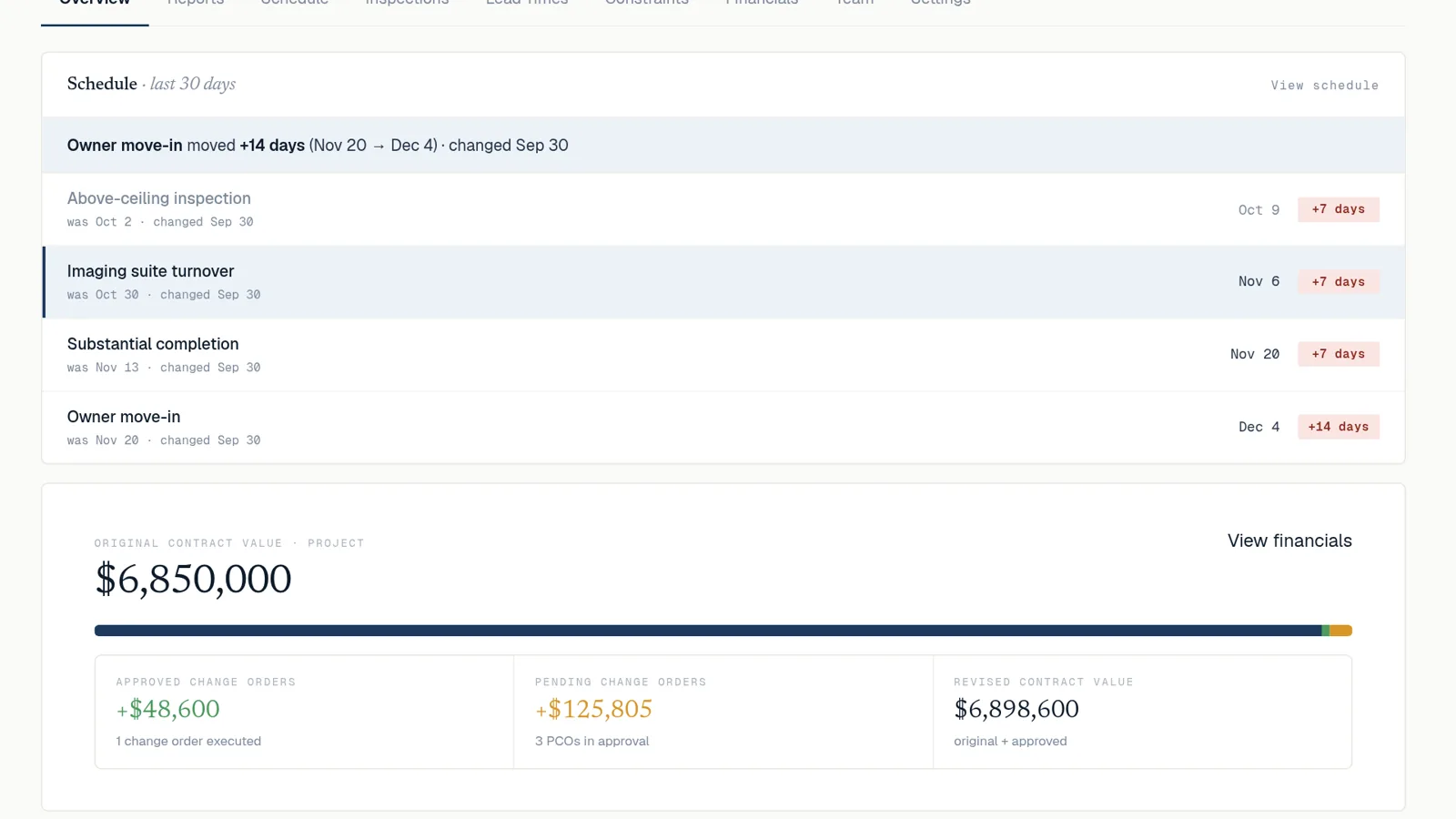
Leadership sees the same view across every active job
Your leadership sees the same view, across every active job, without assembling it from each PM.
Want to click through it first? Open the sample account.
“StructionWise started as a fix for my own Friday report. Then I saw the bigger problem: constraints, inspections, change orders and schedules all live in different places, so leadership and clients find out late, when it's already expensive. StructionWise connects them, so everyone on the job sees what matters in time to act.”
Zack Holley, founder
FAQ
What is a potential change order?
A change to contract scope, cost or time that has been identified but not yet signed. Once every required party signs it, it becomes an approved change.
What is the difference between a PCO and a change order?
A PCO is still open. A change order is signed and changes the contract sum or time.
What columns belong in a PCO log?
PCO number, title, origin, reference, dates, submitted value, schedule days, status, who it's waiting on, days open, and the approved value and date.
Can a client sign a PCO electronically?
Yes. In StructionWise, the GC uploads the PCO PDF. Signatures follow the order you set, and each signer signs with their own PIN, whether that's your team, the owner's rep or CM, or your client. A CM is added as an Owner's Rep. Once it's signed, every signer can download the signed PCO.
Does StructionWise replace the project software we already use?
No. It doesn't replace your PM system. It gives your client a clear view of where the job stands and what's waiting on them, and gives your leadership that same view across every active job.
Then see it on a real job of yours: Book an Intro